Auto Zoom Screen Recorder for Mac
Record your screen. CursorClip zooms in on every click automatically, so the small UI you are demoing is actually readable. No keyframes to set and no multi-track timeline to learn. Add system audio, your mic and your webcam, then export MP4 or GIF.
Record and edit free, no account. $70 once when you are ready to export.
- $70 once, not every month
- 27.4 MB native app, no Electron
- Runs on Intel and Apple Silicon
- 3 Macs per license
Layouts
Your screen, your camera, or both.
Cut between Screen, Camera, Side by side and more on the timeline, with Cut, Fade and Morph transitions.
Explore layouts →Teleprompter
Your words. Your pace.
Prepare your script before recording. Use floating notes, optional auto-scroll and a translucent background.
Explore the teleprompter →Looks
Your recording style, saved.
Save your canvas, cursor and motion settings. Reuse them across projects or make a Look your default.
Crop
Choose what stays in frame.
Crop your recording in the editor. Keep your background, padding and finishing touches around the video.
Auto Zoom That Follows Your Cursor
If you need a screen recorder with auto zoom, CursorClip tracks the active area and applies smooth motion as you move, click, and type. Record once, then export without a timeline full of manual keyframes.
- ✅Zooms are placed automatically from where you click.
- ✅Natural easing and speeds tuned for comprehension.
- ✅For many one-take demos, review and export without manual keyframes.


Used by 226+ creators, founders, and product builders
Onboarding videos
Course material
Product demos
How-to guides
Research demos
Support videos
Feature walkthroughs
Internal training
Built for Professionals Who Value Their Time
Native, Not Bloated
Light enough to leave running all day. A 27.4 MB download in one process, where many Mac recorders are Electron apps hauling a 200MB-plus browser engine and a swarm of helpers around with them.
Smart, Not Complicated
No manual keyframing. Automatic focus makes your demos clear and watchable, and the zoom points stay editable if you disagree with one. Making a product demo? See the product demo video maker.
Honest, Not Greedy
Pay once, own it forever. Record and edit offline. Your recordings never leave your Mac. 14-day money-back guarantee on paid plans.
Features you will love
Screen recorder that follows your cursor
CursorClip keeps the active part of the screen readable while you move through a workflow, so demos feel guided instead of static. Learn how auto zoom works
Camera capture
Record your webcam alongside your screen for engaging product demos, tutorials, and walkthroughs.
Custom backgrounds
Customize your recorded video background for attention‑grabbing demos.
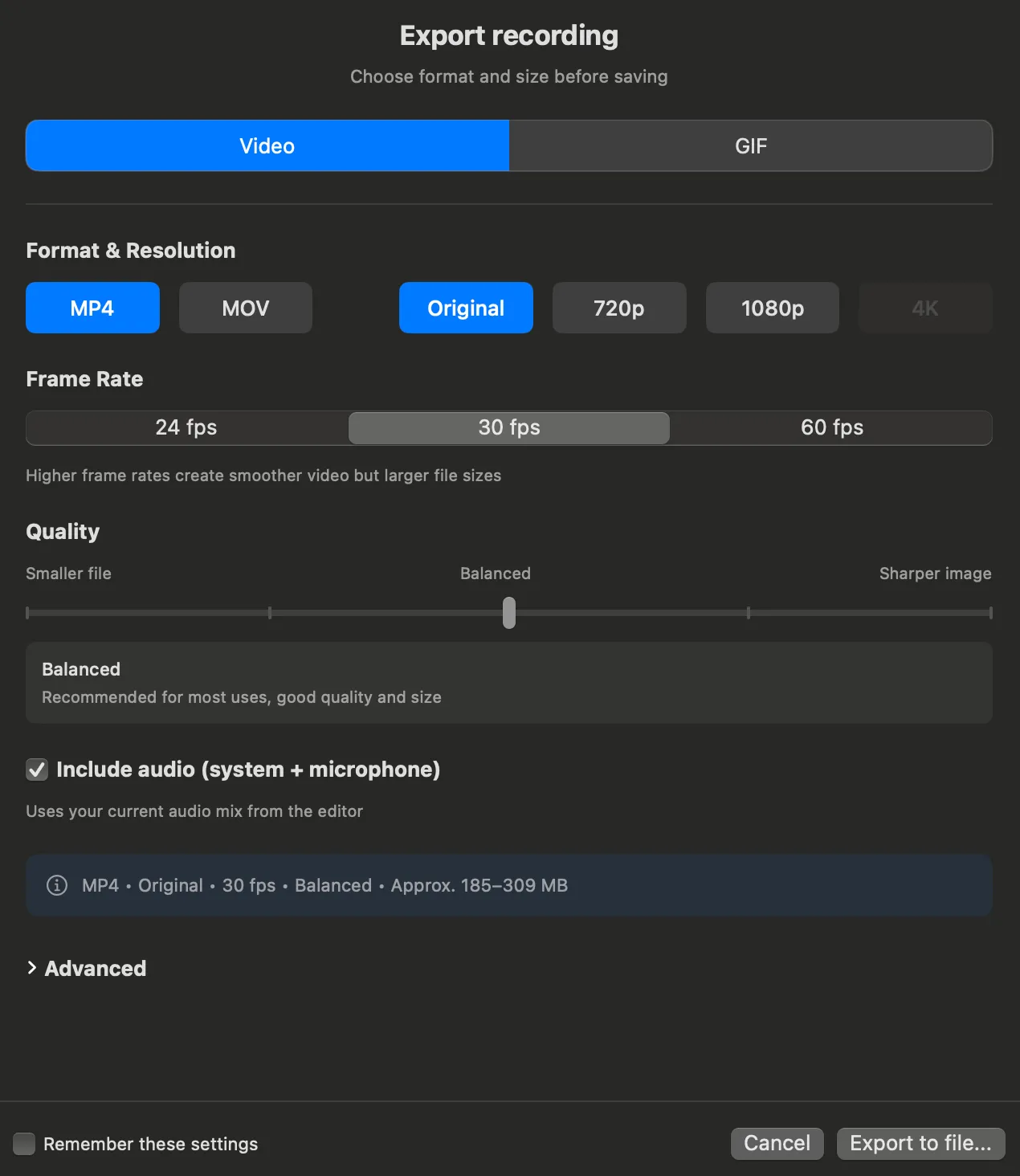
Video or GIF Export
Export your videos up to 4K at 60fps as MP4 or MOV, or as a super optimized GIF for social media sharing.
GIF export covers recordings under 10 minutes.
Customizable cursor size
Choose the perfect cursor size for your recording to ensure maximum visibility and professional appearance.
Simple yet powerful video editor
Control zoom effects, remove or manually add zoom points, and fine‑tune your recordings with our intuitive editor.
Save projects and edit later
Save your recording as a project, come back anytime, make changes, and export when it is ready. Perfect for demos you want to polish in multiple passes.
A real Mac app, not a web app in a costume
CursorClip is 27.4 MB of native Swift. A lot of Mac recorders are Electron: a web page wrapped in a browser, shipped to you as a 300 MB download, running a whole Chromium engine in the background while you record.
Leave it open all day and your Mac will not notice. No fan spinning up, no battery quietly draining, no slowdown when you switch back to the thing you were demoing. It opens the moment you click it, records, and gets out of the way.
The reason is boring and it is the whole point: CursorClip is native Swift running as one process on about 100MB. Many Mac recorders are Electron, which means a full browser engine plus a renderer, a GPU process and a fistful of helpers, all awake and all eating into your battery whether you are recording or not. Open Activity Monitor and compare them yourself.
Specifications
- Recording: up to 4K at 60fps. Capture runs at your display's resolution, and frame rate follows its refresh rate.
- Audio: System + Microphone (independent or mixed).
- Export: MP4 or MOV (H.264 or HEVC) up to 4K (3840 × 2160) at 60fps, plus GIF. GIF export covers recordings under 10 minutes.
- System: macOS 13.5 (Ventura) or later; Apple Silicon & Intel supported.
Pay once. Own it.
Most Mac screen recorders bill you every month, forever. CursorClip is $70 one time. Three years in, a $10/month tool has taken $360 and CursorClip has still taken $70.
Record and edit free while you decide. A license unlocks export, and every plan carries a 14-day money-back guarantee.
View CursorClip pricing - $70 Download CursorClipPay once, use forever. 14-day money-back guarantee.
Frequently asked questions
What is an auto zoom screen recorder?
An auto zoom screen recorder automatically zooms and pans to active areas on your screen so recordings are easier to follow without manual keyframing.
Does CursorClip follow the cursor automatically?
Yes. CursorClip zooms in automatically where you click, then pans to follow your cursor while the zoom is held. You can adjust, remove, or add zoom points afterwards.
Can CursorClip record system audio on Mac?
Yes. CursorClip can record system audio and microphone audio, either independently or mixed.
Does CursorClip work on Intel and Apple Silicon?
Yes. CursorClip supports both Intel and Apple Silicon Macs on macOS 13.5 (Ventura) or later.
Is CursorClip a one time purchase?
Yes. CursorClip is available as a one-time purchase with lifetime access to the core app. See full details on the pricing page.
Record one demo and see the difference
It takes about two minutes. Record something small and fiddly, the kind of thing people usually squint at, and watch the zoom land on every click by itself. Recording and editing are free, so the only thing you are risking is the two minutes.
Pay once, use forever. 14-day money-back guarantee.