Vidyard and CursorClip both let you record your screen. That’s roughly where the overlap ends.
Vidyard is an AI-powered video selling platform. Its core value proposition is helping sales teams close more deals with personalized video outreach: AI avatars, buyer engagement analytics, automated video sequences, and CRM integrations with Salesforce and HubSpot (available on the Teams plan). Screen recording is one feature inside a large revenue tool designed for sales teams.
CursorClip is a screen recorder. Native macOS, about 46 MB installed, cursor-follow auto-zoom, $70 once. That’s the whole product.
If you’re looking for a Vidyard alternative for Mac that doesn’t charge $89/month (or $708/year) for a sales platform you’re mainly using as a screen recorder, that’s exactly what this comparison covers.
Vidyard vs CursorClip: Full Comparison
| Feature | Vidyard | CursorClip |
|---|---|---|
| Price | Free plan · $59/user/month Starter (annual) · $89/user/month (monthly) | $70 one-time |
| Subscription required | Yes, Starter renews annually | No, buy once, own forever |
| Free option | Free plan: 5 recordings/month, sharing included | Free to record and edit; license to export |
| Primary use case | AI-powered video selling, sales outreach | Screen recording |
| Screen recording | Available (secondary feature) | Core feature |
| Auto-zoom | None | Cursor-follow auto-zoom |
| Mac support | Browser extension + desktop app built on Electron (its Mac download contains the Electron framework, checked 2 October 2026) | Native macOS app |
| Windows support | Yes, browser-based | No |
| Works offline | No, cloud-dependent | Fully offline |
| Direct GIF export | Not part of the core workflow | Yes (optimized) |
| 4K recording | Yes (all plans including free) | Yes, 4K 60fps |
| CRM integrations | Teams plan only (custom pricing) | No |
| AI video agent | Yes, automated personalized video sequences | No |
| Viewer analytics | Yes, detailed engagement tracking | No |
| Cloud hosting | Yes, videos hosted on Vidyard | No, local files only |
| Instant sharing link | Yes | No, local file, you host |
| App size | Browser extension / desktop app | ~46 MB installed, native app |
| macOS requirement | N/A | macOS 13.5 (Ventura) or later |
| Money-back guarantee | No stated policy | 14-day money-back |
Vidyard Pricing: What You’re Actually Paying For
Vidyard has a free plan and a paid Starter plan. The free plan is genuinely useful for light individual use: 5 recorded videos per month, basic sharing, and 15 AI videos total.
| Plan | Monthly price | Annual cost per user |
|---|---|---|
| Vidyard Free | $0 | $0, 5 recordings/month, sharing included |
| Vidyard Starter | $59/user/month (annual) · $89/user/month (monthly) | $708/year annual |
| Video Agent add-on | +$24/user/month (annual) · +$29/user/month (monthly) | +$288/year annual |
| CursorClip | N/A | $70 once, total |
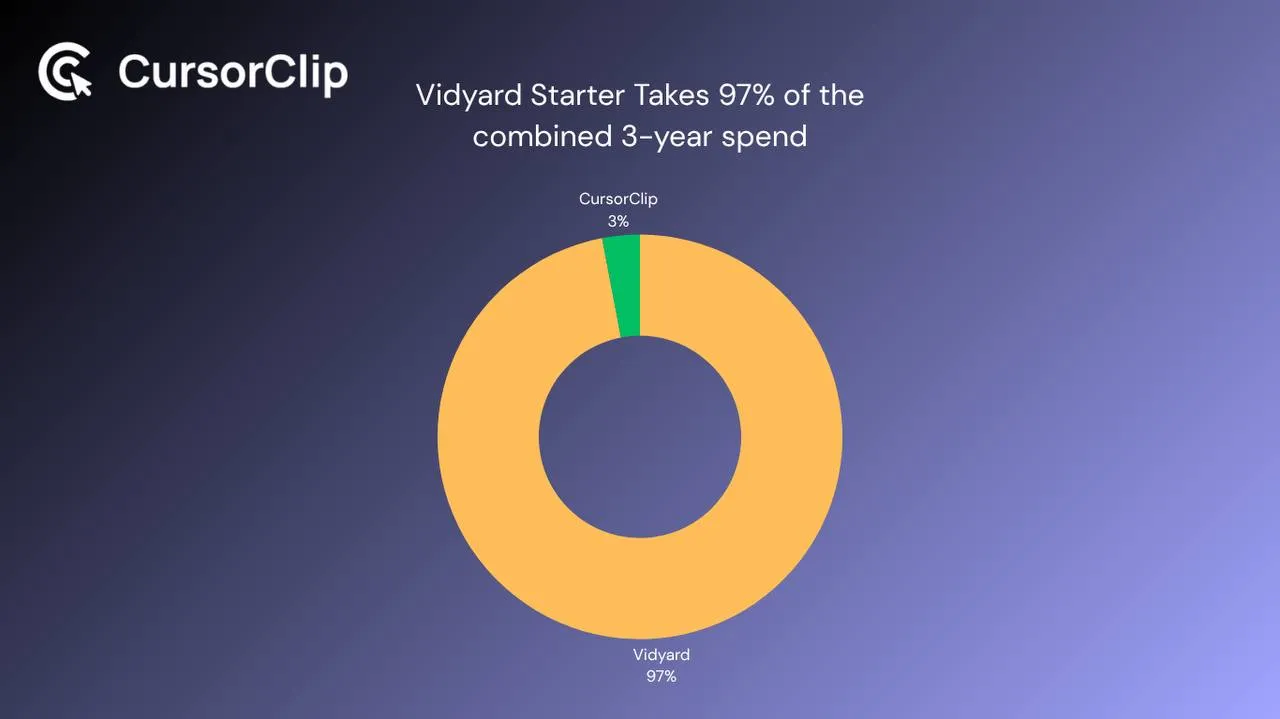
Here’s what that costs over time compared to a CursorClip lifetime license:
| Year 1 | Year 2 | Year 3 | Total | |
|---|---|---|---|---|
| Vidyard Starter | $708 | $708 | $708 | $2,124 |
| CursorClip | $70 | $0 | $0 | $70 |
| Difference | $638 | $708 | $708 | $2,054 more |
Vidyard’s Starter plan costs more than a CursorClip lifetime license in the first month. Over three years, the gap is over $2,000 per person.
One important thing to flag: CRM integrations (Salesforce, HubSpot, Salesloft) are gated behind the Teams plan at custom pricing. If you’re evaluating Vidyard for a small team mainly using it to record and share demos, you’re on Starter, and the CRM features that make Vidyard compelling for large sales teams aren’t available to you at that tier.
What Vidyard Is Actually Built For
Vidyard’s product is built around one idea: help sales teams break through with personalized video. AI avatars that generate videos automatically when a buyer takes a CRM action. Video Agent that sends personalized sequences at scale. Granular engagement analytics that show exactly when a prospect watched and for how long. On the Teams plan, deep integrations with Salesforce, Salesloft, HubSpot, and Outreach feed all of that data back into your CRM automatically.
That’s a legitimate, well-executed product. Vidyard’s customers use it to book more meetings, close more deals, and automate video outreach across large sales teams.
CursorClip is built around a different idea: a screen recording of your software should look professionally edited without any editing. Cursor-follow auto-zoom handles the visual presentation during recording, no cloud, no CRM, no analytics. Just a recording that shows your product clearly and an export that goes wherever you want it.
These aren’t competing tools in the same category. They overlap in one feature, screen recording, and diverge completely everywhere else.
Vidyard’s Recording and Sharing Flow
Vidyard records through a browser extension or desktop app. You hit record, capture your screen or webcam or both, and when you stop, the video immediately uploads to Vidyard’s cloud and a shareable link is ready. For quick async communication, a sales rep sending a personalized walkthrough of a proposal, this workflow is fast and built for it.
What Vidyard doesn’t do during recording: zoom. The recording captures your full screen or window at whatever resolution it is. No cursor tracking, no automatic focus on what you’re interacting with. For demos of software with small UI elements, viewers watch the cursor move around an interface they can barely read.
CursorClip tracks your cursor continuously during recording. Click a small button, the recording zooms in. Open a dropdown, it follows. Navigate to a new section, it pans with you. The file saves locally when you stop. No upload step, no cloud processing.
Analytics and Hosting: Where Vidyard Has No Equivalent
Vidyard’s viewer analytics are a genuine differentiator that CursorClip simply doesn’t have:
- Per-viewer engagement tracking, see exactly who watched, how far they watched, and where they dropped off
- CTA performance, track clicks on calls-to-action embedded in videos
- Deal-level reporting, on Teams, video engagement data feeds directly into Salesforce and HubSpot records
- Team video libraries, shared content management with performance reporting across reps
CursorClip produces a local file. There’s no hosted player, no viewer analytics, and no reporting of any kind. If engagement data is part of your sales workflow, CursorClip doesn’t cover it.
Sharing Model: Instant Sales Links vs Local Files
Vidyard: Finish recording, get a shareable link with a branded player, view tracking, and an optional CTA. The video lives on Vidyard’s servers. For sales outreach where knowing whether a prospect watched matters, this is built exactly for that.
The dependency: your video library lives on Vidyard’s infrastructure. On paid plans, cancelling moves you back to free tier restrictions. Download anything you want to keep before cancelling.
CursorClip: Finish recording, get a local file, MP4 or GIF, saved to your drive. You control where it goes: your CDN, a <video> tag on a landing page, Notion, email, Twitter. No hosted player, no dependency on any external service.
The dependency: you’re responsible for hosting. There’s no built-in sharing or analytics.
Vidyard’s sharing model is built for sales outreach. CursorClip’s local file is built for publishing, embedding, and distributing through channels you control.
Where Vidyard Wins
Vidyard’s sales tooling is in a different league. If your team needs:
- Automated personalized video sequences triggered by buyer behavior
- Deep CRM integration with Salesforce, HubSpot, Salesloft, or Outreach (Teams plan)
- Engagement analytics showing who watched, when, and for how long
- AI avatar video generation at scale
- Team-wide video libraries with shared content management
CursorClip doesn’t do any of this. It’s not a sales platform. If video selling infrastructure is what you’re buying, Vidyard is the product designed for that.
Who Each Tool Is Actually For
Vidyard is the right fit if…
- You run or manage a sales team doing outbound video prospecting
- CRM integration and viewer engagement analytics are central to your workflow
- You need AI avatar video generation or automated video sequences
- Your team needs shared video libraries and performance reporting
- You use video primarily for sales outreach, not product demos
CursorClip is the right fit if…
- You’re not running a sales team, you’re a founder, PM, or developer advocate who just needs clean recordings of your product
- You evaluated Vidyard for screen recording and realized you’re paying for a sales infrastructure you’re not using
- CRM integration and viewer analytics aren’t part of your workflow, you just need the recording to look good and go somewhere useful
- You need direct GIF exports for changelogs, docs, or tweets, Vidyard’s workflow centers on share links and video downloads
- $708/year per seat for a tool you’re using as a basic screen recorder doesn’t make sense for your team size or budget
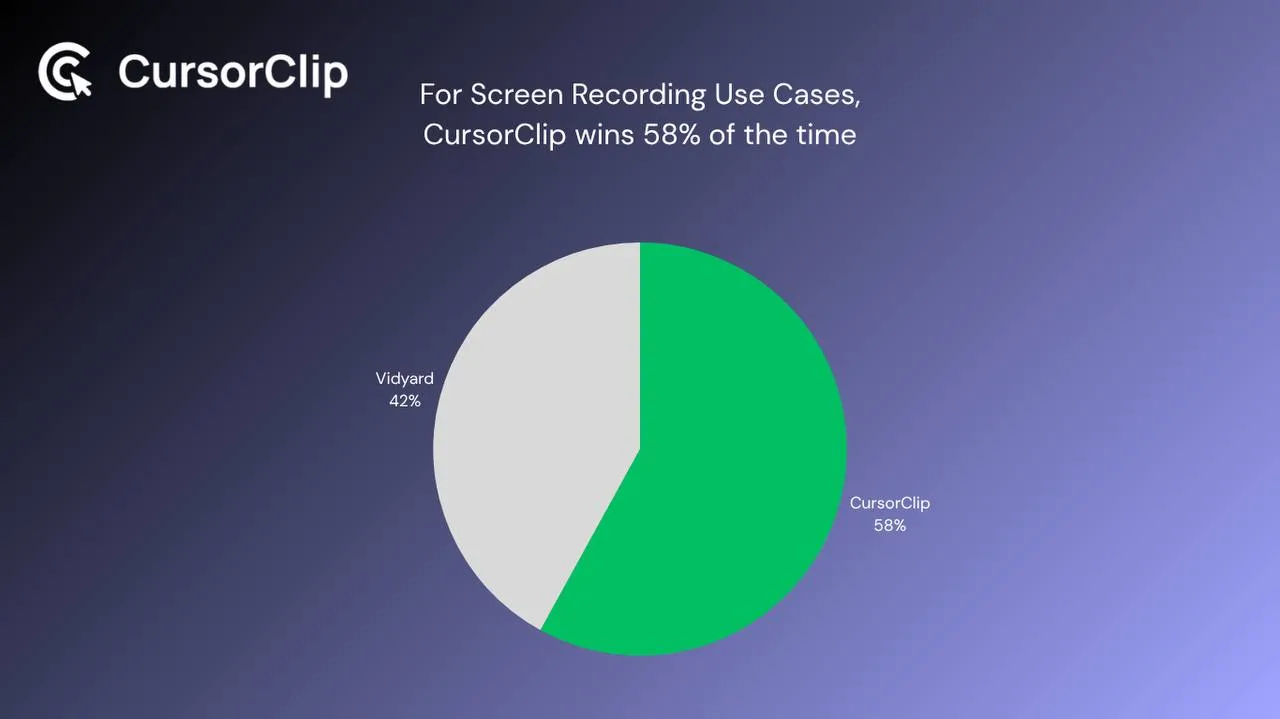
Use Case Breakdown
| Use case | Better pick | Why |
|---|---|---|
| Product demo for landing page | CursorClip | Auto-zoom keeps small UI elements legible |
| Sales outreach video to a prospect | Vidyard | Analytics show when they watched; branded hosted link |
| Feature announcement GIF | CursorClip | Native GIF export; Vidyard’s workflow centers on share links and video downloads |
| Software walkthrough with UI clicks | CursorClip | Cursor-follow zoom handles every interaction |
| Automated video prospecting at scale | Vidyard | Video Agent and AI avatars built for exactly this |
| Onboarding walkthrough for SaaS | CursorClip | Clean one-take recording, auto-zoomed |
| Team video analytics and reporting | Vidyard | Granular viewer engagement data is Vidyard’s strength |
| Changelog screen recording | CursorClip | Optimized GIF output, no upload required |
| CRM-integrated video for deals | Vidyard Teams | Salesforce/HubSpot integrations, Teams plan only |
| Recording fully offline | CursorClip | Vidyard requires cloud upload |
| Windows + Mac mixed team | Vidyard | CursorClip is Mac-only |
| Quick UI demo with readable results | CursorClip | Auto-zoom; Vidyard has no cursor tracking |
Frequently Asked Questions
What is Vidyard’s free plan?
Vidyard’s free plan allows up to 5 recorded videos per month with no credit card required. It includes 15 AI videos total and basic sharing features. Unlimited recording, full analytics, and branded sharing pages require Starter, $89/user/month billed monthly, or $59/user/month billed annually ($708/year). CRM integrations require the Teams plan at custom pricing.
Does Vidyard have a one-time payment option?
No. Vidyard is subscription-only. The Starter plan is $89/user/month billed monthly, or $59/user/month billed annually. There’s no lifetime license. CursorClip is $70 once with no renewal.
Does Vidyard work on Mac natively?
Vidyard works on Mac through a browser extension and a desktop app. The desktop app is built on Electron, which ships a copy of the Chromium browser engine inside the app (the Mac release linked from Vidyard’s desktop app page contains the Electron framework, checked 2 October 2026). CursorClip is built natively for macOS, optimized for Apple Silicon, and requires macOS 13.5 (Ventura) or later.
Does Vidyard have auto-zoom for screen recordings?
No. Vidyard records your screen as-is with no cursor tracking or automatic zoom. For software demos with small UI elements, viewers see a full-size recording where interactive elements can be hard to read. CursorClip tracks your cursor during recording and automatically zooms into whatever you’re interacting with.
Does Vidyard support direct GIF export?
Vidyard’s workflow centers on hosted share links and video downloads. Its official download docs describe original-file downloads and MP4 versions, not direct GIF export. CursorClip exports optimized GIFs natively, useful for changelogs, tweets, GitHub README files, Notion docs, and Slack where GIF autoplays without a click.
What happens to my Vidyard videos if I cancel?
On the free plan, videos remain accessible. On paid plans, cancelling moves you back to free tier capabilities, which may restrict access to certain videos or features depending on what plan features they used. Before cancelling a paid plan, download any videos you want to keep. CursorClip recordings are local files on your Mac, they’re unaffected by anything account-related.
Can CursorClip replace Vidyard for sales teams?
No. CursorClip doesn’t integrate with CRMs, doesn’t send automated video sequences, doesn’t provide viewer engagement analytics, and doesn’t have AI avatar generation. For a sales team running outbound video at scale, Vidyard is a fundamentally different product. For a Mac user who needs polished product demos and walkthroughs without a monthly bill, CursorClip is the better fit.
Is Vidyard worth it for a solo founder or small team?
The free plan hits limits at 5 recordings per month, and Starter is $708/year per person. CRM integrations require the Teams plan at custom pricing. For a solo founder or small product team using it mainly for screen demos, Vidyard’s sales infrastructure doesn’t get used, and CursorClip at $70 once covers everything needed for product demo and walkthrough recordings, with auto-zoom included.
Vidyard is a sales platform. CursorClip is a screen recorder. They’re not really competing for the same buyer, they overlap in one feature area and that’s it.
If you’re running a sales team that needs video prospecting infrastructure, CRM integration, and engagement analytics, Vidyard earns its price for the right workflow. If you’re a Mac user who needs polished screen recordings of software and came to this page because $89/month (or $708/year) for a sales platform doesn’t make sense for what you’re actually doing with it, CursorClip is the straightforward answer.
Links, you may find useful:

